
Allergens and badges
Marking the 14 EU allergens per dish, setting up the allergen key, and the vegan, gluten-free, spicy and other badges.
The 14 main allergens of the European Union must be indicated to guests. In the editor you can do this per dish in a few clicks, and the system creates the key for you.
Marking allergens
Select the dish.
In the Allergens (EU 1–14) section of the right-hand panel, click the allergens the dish contains. A selected button is highlighted; click again to switch it off.
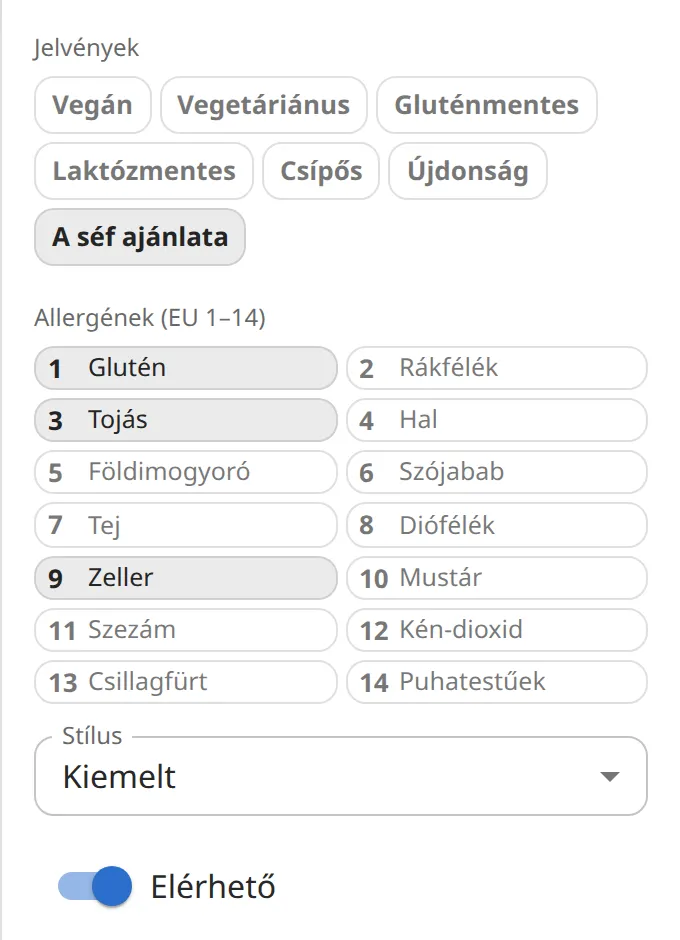
On the page, the allergen numbers appear next to the dish name, and the key explains what the numbers mean.
The 14 allergens
- 1 Gluten · 2 Crustaceans · 3 Eggs · 4 Fish · 5 Peanuts · 6 Soybeans · 7 Milk
- 8 Tree nuts · 9 Celery · 10 Mustard · 11 Sesame · 12 Sulphur dioxide · 13 Lupin · 14 Molluscs
Key and display
In the Menu settings section of the left-hand panel, choose the language of the key in the Allergen key language field: Hungarian, English or German.
If for some reason you don't want allergens shown on the page (for example on a drinks list), switch off the Show allergens toggle. The data you entered stays, and reappears when you switch it back on.
Badges
Above the allergens, in the Badges section, you can switch on seven badges per dish: Vegan, Vegetarian, Gluten-free, Lactose-free, Spicy, New, Chef's special. They appear next to the dish as small icons or labels, in the style of the template.