
FAQ and troubleshooting
Short answers to the most common questions: plans, watermark, editing on mobile, missing photos, overflowing content, save errors.
If you don't find the answer to your question here, look at the article on the topic on the Help home page.
Editing on a phone and tablet
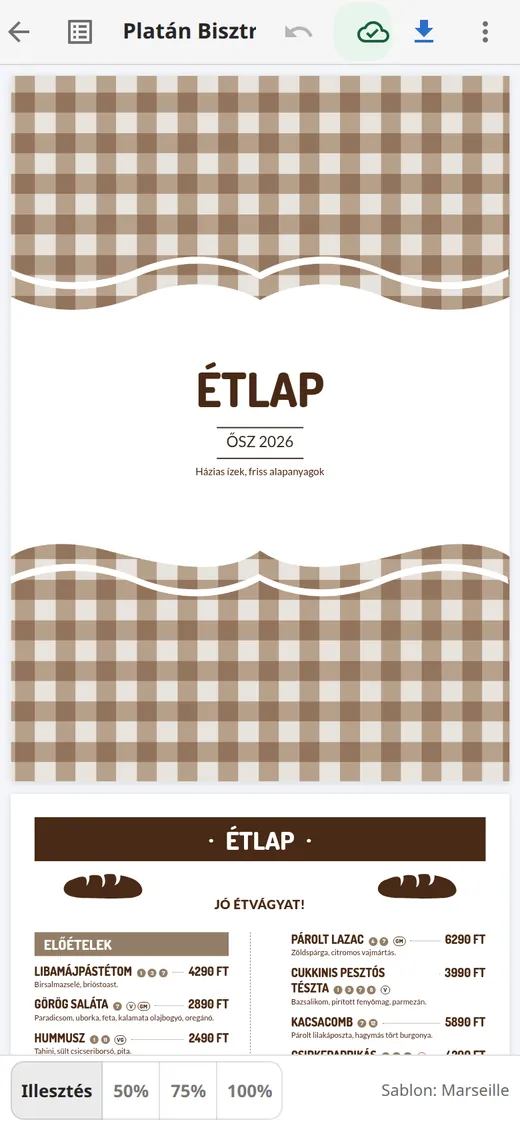
The editor also works on a narrow screen. The page is shown at full width, you open the list of pages and content with the icon at the left of the top bar (Pages and content), and the fields of the selected element appear in a Properties panel that slides up from the bottom. Less frequent actions (Switch template, Embed and share, size) move to the ⋮ menu at the top right.
Open your menu on your phone and tap the element you want to edit.
Frequently asked questions
How much does Étlap-készítés cost?
Signing up, editing, every template, embedding and sharing are free. On the free plan the PDF carries a watermark, and the built-in stock photo gallery can't be used. A subscription unlocks both.
Why is there a watermark on my pages?
On the free plan, a "free version" watermark appears on the editor's pages and on the downloaded PDF. After subscribing, the PDF is created without a watermark.
After switching templates my photos (or the second price, the logo, the allergens) disappeared. Are they lost?
No. Some templates don't show this data; in that case the template switch dialog warns you in advance. The data stays, and reappears if you switch to a template that shows it. You can also switch back right away with Ctrl+Z.
My menu is too long and has more pages than I wanted. What can I do?
The system starts a new page automatically when the content doesn't fit. It gets shorter if you choose the two-column layout (Page settings → Page layout), shorten the descriptions, use the "On one line, with a slash" mode on a multilingual menu, or choose a larger paper size.
The save indicator shows "Save error – retry".
The editor couldn't reach the server. Don't close the tab: the editor retries by itself, and your browser also keeps the changes as a draft. Check your internet connection, then click the indicator. If the error persists, reload the page: the editor offers to restore the unsaved changes.
I'd like the same menu in two sizes or two versions (for example lunch and dinner).
On the My menus page, make a copy with the Duplicate button, then edit the copy. The copy's name gets a "(copy)" ending, which you can change in the editor.
I accidentally deleted a dish or a page.
Press Ctrl+Z or click the Undo arrow in the top bar: the editor can undo the last 50 steps. Deleting a whole menu, however, is permanent, which is why the system asks for confirmation.
I changed the price, but Facebook still shows the old image.
The short link and the embedded menu update immediately after saving. Facebook, however, caches the preview image: in the Embed and share dialog, click the "Refresh preview on Facebook" link.
The embedded menu doesn't appear on my website.
Check that the menu is public (Embed and share → The menu is public) and that both parts of the code (the script line and the etlap-menu element) were added. If your website builder doesn't allow scripts (for example Wix or the free plan of wordpress.com), use the "iframe only" mode.
What images can I upload?
JPG, PNG or WebP files, up to 10 MB. The system automatically rotates and optimizes the image.
I forgot my password.
On the sign-in page, click the "Forgot your password?" link and enter your email address. We will send you a link to set a new password.
Can I bring over my existing menu?
Yes. On the My menus page, use the Import menu button to create a draft from a Wolt or Foodora link, pasted text (one dish per line, with the price at the end of the line), a photo or a PDF. Always review the result in the editor.